Kick and bass in the Phase Scope
When a kick and a bass play their lows at the same time, they add up, or cancel each other out. Cancelling is why a low end can sound thin although both tracks sound fat on their own. The Phase Scope shows the two on top of each other, beat by beat, and says whether their lows fit. This guide uses two Das-Meter Sends, one on each track.
1. Put a Das-Meter Send on each track
In your DAW, add Das-Meter Send (CLAP, VST3 or AU) as an effect on:
- the kick track, and
- the bass track.
Each Send is named after its track and takes its colour, so you'll know them apart. Put them last in each track's chain (after EQ and compression), so they hear what you hear. See Send Plugins to install them.
2. Show the kick in a Phase Scope
- Right-click a Meter, Add Meter ▸ Phase Scope.
- In its menu, Listen to ▸ Send Plugins, and pick the kick's Send.
- Press play. The Phase Scope follows your DAW's tempo and beat, so the kick stands still on the beat. Pick Cycle ▸ Beat for one beat across the Meter, or Bar to see the whole bar.
3. Overlay the bass
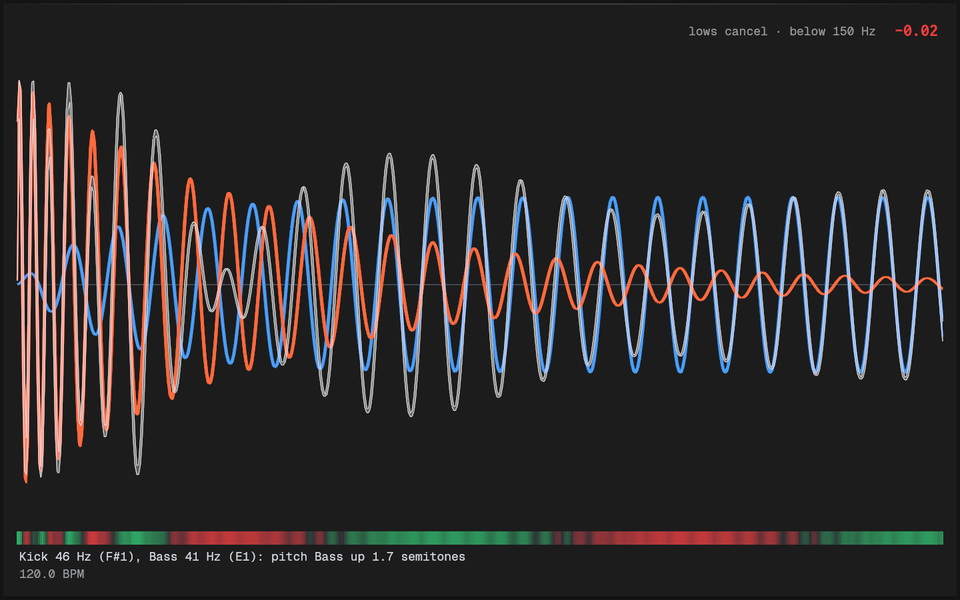
In the Phase Scope's menu, pick Overlay Source ▸ the bass's Send. Now you see:
- the kick (the main trace),
- the bass over it, in its own Send's colour, placed by its own song position, so the two line up as they do in the song,
- their sum on top: what's actually left of the two together,
- and a lane under them: green where their lows push together, red where they cancel, stronger where they're louder.
The number above the waves is their Cycle correlation below 150 Hz: +1 when the lows move together, −1 when one is the other upside down, with what it means in words.
4. Make them fit
Turn on Suggestions. When the lows don't fit, the Phase Scope says what would help:
- Flip the bass's polarity: the bass's lows are upside down against the kick's. Use your DAW's phase/polarity button (Ø) on the bass, or the kick, and watch the lane turn green.
- Move the bass by so many ms: the bass's lows come a little early or late. Set that as the Phase Scope's Offset to hear and see it first, then delay (or advance) the bass track by that much in your DAW.
- Pitch it to match: the kick's tone and the bass's note are too far apart to ever line up; tune the kick to the bass's key.
Once they fit, it says Lows fit, in green, with the number. If nothing simple would help, it says that too, so every change gets an answer.
Why the sum matters
Listen to the sum line: when it's bigger than either wave, the low end hits harder; when it's smaller, you're losing it. A red lane right where the kick hits is the typical "my kick disappears when the bass plays".
Without Send Plugins
On System Capture there's only one Source (everything together), so there's nothing to overlay. Solo the kick and the bass in your DAW and watch the sum, or use the Sends as above.